Understanding process, store, and transmit definitions under the final rule
CUI assets face the most rigorous assessment in CMMC Level 2.
While security protection assets get evaluated only for relevant capabilities, and contractor risk managed assets get SSP review with spot checks, CUI assets get assessed against all 110 security requirements.
Understanding what makes something a CUI asset—and what doesn’t—matters enormously for your assessment scope and preparation effort.
The Definition That Drives Everything
CUI assets are defined as assets that process, store, or transmit CUI.
Simple on the surface. Dangerously simple, actually.
The scoping guide elaborates on each term, but there’s an important language issue to address first.
The “Can Be” vs “Is” Problem
The Level 2 scoping guide says CUI “can be used by an asset.” But here’s the problem: lots of things CAN do something. Far fewer things ARE doing something.
In the Level 1 and Level 3 scoping guides, DOD changed this language to “is used by an asset.” Most assessors believe this change was intended for Level 2 as well but got missed during editing.
Why does this matter?
If “can be” is taken literally, nearly everything on your network could theoretically access CUI somehow. That interpretation makes the scoping guide unworkable.
The practical interpretation—what assessors actually apply—is “is used by an asset.” What’s the asset actually doing with CUI? Not what could it theoretically do.
The “can but is not” scenario gets handled by a different category: contractor risk managed assets. Assets that have the ability to access CUI but aren’t intended to, because you have policies, procedures, or practices preventing it.
Processing: What It Actually Means
Processing means CUI is used by an asset—accessed, entered, edited, generated, manipulated, or printed.
Computer processing examples:
When you open a CUI document, your computer loads it into active memory. The CPU processes the content. The graphics card renders it on screen. That’s processing.
When you edit a document, your changes go through the CPU. When you print, the computer processes the print job before sending it to the printer.
Human processing:
People are assets in CMMC. When someone reads a CUI schematic and comprehends the information, that’s processing. The CUI is now in their brain.
Less obvious processing:
Antivirus servers process CUI when they scan files. Even though the purpose is malware detection, the server reads file contents during scanning. If those files contain CUI, the antivirus server processed CUI.
This catches many organizations by surprise. They didn’t think of their security tools as touching CUI at all, because those tools don’t “work with” CUI in the traditional sense. But scanning is processing. A tool like this is categorized as a Security Protection Asset, not a CUI asset, even though it processes CUI in the technical sense.
Web browsers and processing:
When you view a document through a web browser, your local computer is processing it.
Web browsers request content from servers, receive the data (text, images, formatting code), and render it locally. The processing happens on your machine, not the server.
This matters because some organizations assumed accessing web-based content meant their local computers weren’t processing CUI. They are.
The VDI Clarification That Changed Everything
Virtual Desktop Infrastructure creates a different scenario.
With VDI, you’re connecting to a remote computer. That remote system has its own CPU, memory, and storage doing the actual processing. Your local device is essentially a monitor displaying video output while sending keyboard and mouse input.
The question: Does that video signal constitute processing CUI?
Before the final rule, opinions varied. Some assessors said yes—you’re seeing CUI on your screen. Others said no—you’re just displaying a video stream.
The final rule provided definitive clarification: If your VDI session blocks data transfer and only passes keyboard, mouse, and video signals, the local endpoint is out of scope.
Configuration requirements for VDI out-of-scope status:
No copy/paste between session and local device
No printing to local printers
No saving to local drives
No saving to USB devices
Only keyboard input and screen output crossing the boundary
This was possibly the biggest win of the final rule. Enterprise organizations using VDI strategies and companies selling VDI solutions all benefited from this clarity.
Your VDI endpoints can now be out of scope entirely if configured correctly.
Storage: The Electricity Test
Storage means CUI persists when you turn off the power.
If you shut down a computer, is CUI still on the hard drive? That’s storage.
If you print CUI and turn off the lights, does the paper still exist? That’s storage.
Common storage locations:
Hard drives in computers and servers. Network attached storage. Cloud storage services. Paper documents in file cabinets. Digital media (USB drives, DVDs). Backup tapes.
Often overlooked storage:
Multifunction printers and scanners typically have internal storage. When you scan a document, it saves an image internally. If that document contained CUI, the scanner is now storing CUI.
Email servers store CUI in mailboxes. Even if users delete messages, the server may retain copies for archival or compliance purposes.
Human storage:
Can people store CUI? It’s technically possible—memorizing detailed specifications, for example. But this is uncommon in business contexts. Generally, human storage of CUI isn’t a practical scoping concern.
Transmission: Moving CUI
Transmission means CUI moves from place to place.
This includes origination (sending), passing through (routing), and reception (receiving).
Network transmission:
Email servers transmit CUI when sending and receiving messages. Network switches transmit CUI when forwarding packets. Routers transmit CUI when directing traffic between networks.
Network cables technically transmit CUI, though assessors generally don’t scope at that level. But active network equipment—switches, routers, firewalls—definitely transmits.
Human transmission:
People transmit CUI when they courier documents. When you carry paper CUI from one location to another, that’s transmission.
Common carrier circuits:
DOD generally considers ISP backbone circuits (AT&T, Verizon, etc.) to be outside your control and responsibility. You don’t need to secure Verizon’s network.
However, DOD wants your data encrypted before it traverses third-party infrastructure. You’re responsible for protecting CUI in transit, even if you’re not responsible for the carrier’s network.
Documentation Requirements for CUI Assets
The scoping guide specifies what organizations must do with CUI assets.
Asset inventory:
Document CUI assets in your inventory at the individual level. This means serial numbers, computer names, service tags—something that uniquely identifies each asset.
You can’t just say “we have laptops.” You need to be able to determine whether a specific laptop is in your CUI asset inventory.
System Security Plan treatment:
Document how you implement each applicable requirement for each asset type.
For a given requirement, explain how you apply it to CUI computers, CUI servers, CUI network devices, CUI facilities, and CUI people (as applicable).
Applicable requirements vary:
Not every requirement applies to every asset type. Training requirements apply to people, not computers. Physical access requirements apply to facilities, not network devices.
You get first attempt at determining applicability. You decide which requirements apply to which asset types in your environment.
Assessors sanity-check your logic. If you claim screen lock requirements don’t apply to your servers, assessors will push back. If you reasonably determine certain requirements don’t apply to certain asset types, assessors generally accept that.
Network diagrams:
Show CUI assets in your network diagram with their relationships to other systems.
Diagrams can be representational. One laptop icon can represent 1,000 laptops. You don’t need individual device drawings.
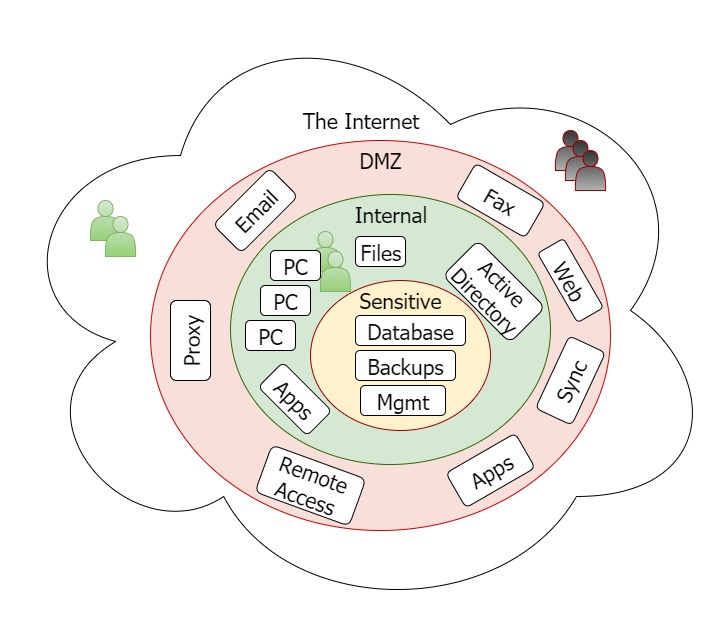
Show important relationships: What’s behind the firewall? What’s in the DMZ? What has direct internet access? How do systems connect?
Assessment preparation:
CUI assets get assessed against all Level 2 security requirements.
Have evidence ready. Know how you implement each requirement for your CUI assets. Be prepared to demonstrate compliance, not just describe it.
Category Overlaps
Assets can fit multiple categories simultaneously.
A file server storing CUI is a CUI asset. If that server has Windows Firewall enabled providing security functions, it’s also a security protection asset.
When categories overlap, assessors apply the highest requirement. CUI asset plus security protection asset equals full assessment against all requirements, plus verification that security functions work correctly.
The one exception: specialized assets.
If an asset qualifies as specialized (government furnished equipment, IoT, operational technology, etc.), the specialized classification wins even if the asset also stores, processes, or transmits CUI.
This makes sense. Specialized assets exist because some things genuinely can’t be fully secured. If CUI asset classification always won, the specialized category would be meaningless.
Kieri Solutions helps defense contractors identify CUI assets and prepare documentation that satisfies assessment requirements. We’ve seen how proper classification and documentation makes the difference between smooth assessments and difficult ones.