Open navigation menu - Kieri Solutions
Exchange 2016 DAG – 3 servers 2 sites

Exchange 2016 DAG - 3 servers 2 sites

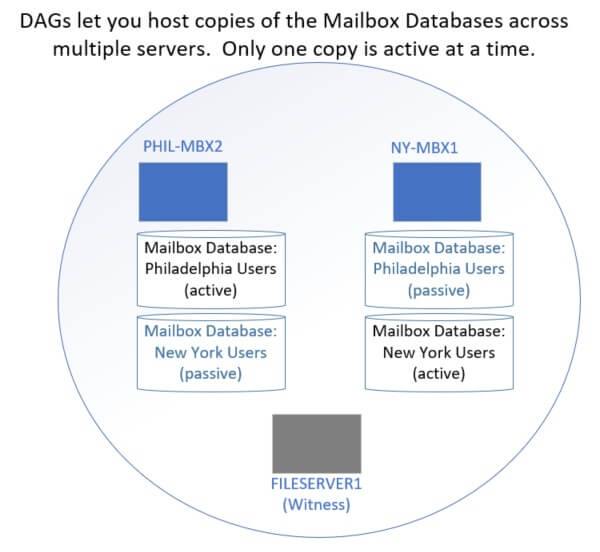
Diagram showing mailbox servers with active and passive databases. Each database is only active on one server.

In this article

This blog describes my lessons learned with Exchange 2016 and 2019 Database Availability Groups.  Particularly the information that most of us will need for the medium business market – less than 5 servers, multiple sites, etc.

This blog is for you if:

  • You are designing an Exchange 2016 or 2019 deployment
  • Trying to decide whether to use DAG or if it even supports your situation
  • You have multiple sites, but not a huge amount of email servers
  • You’d like to know common administrative steps and preventative maintenance
  • You are worried about user impact and unintended consequences of the DAG setup

If you are designing a DAG, trying to decide whether to use DAG, not sure how the servers will react, or how to administer them, read on!

Important disclaimer:  I’m not from Microsoft, I’ve just done the work. These are my opinions and personal lessons-learned and may not be right for your organization.

How does Exchange 2016 and 2019 DAG work?
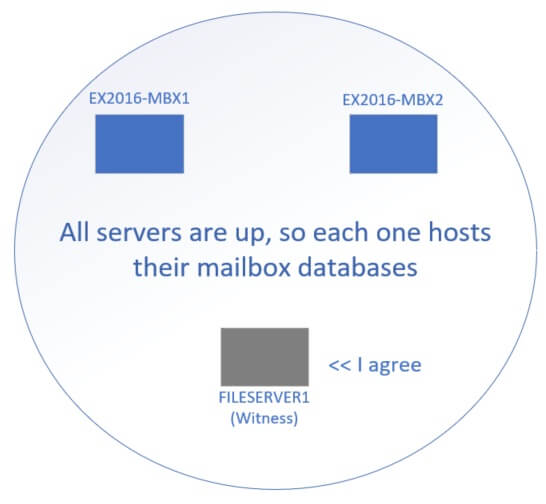
Diagram of how Exchange 2016 DAG works under normal circumstances. The servers all agree that they are up, so they host their databases.
This is a simple DAG with 2 member Exchange Servers and one witness. When everything is going well, both Exchange servers host their active databases. The inactive database copies are kept in sync with constant communication between the DAG members.
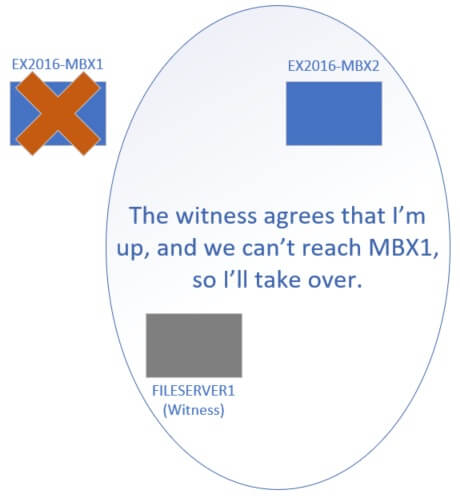
Diagram of a single site / datacenter deployment. When one server goes down, the other two servers decide to take over.
Failover scenario: If one Exchange server goes down (reboots, hardware failure, etc), the other exchange server will check with the witness. The communicating DAG members (the 2 remaining servers) talk and decide that MBX2 should take over. All databases activate on MBX2. Active Directory and the Exchange organization redirects users to MBX2.

DAG across multiple sites or datacenters
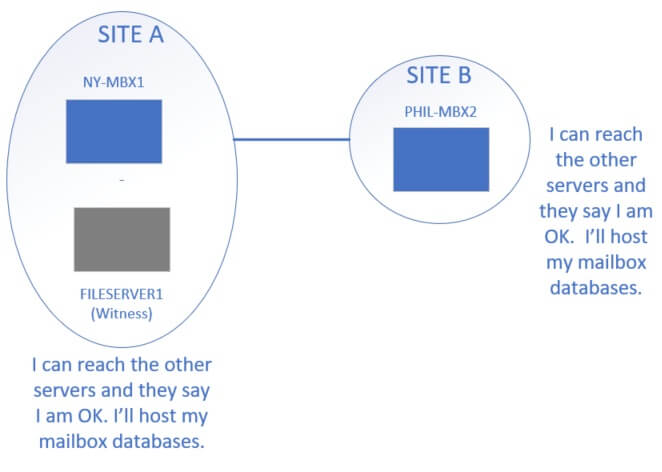
Diagram of Site A - two servers, and Site B - one server. When everything is working well, the DAG quorum works and all servers operate.
Exchange 2016 DAG across multiple sites. . A copy of the mailbox database is held at both sites. The WAN link is used to synchronize the databases from active to passive.
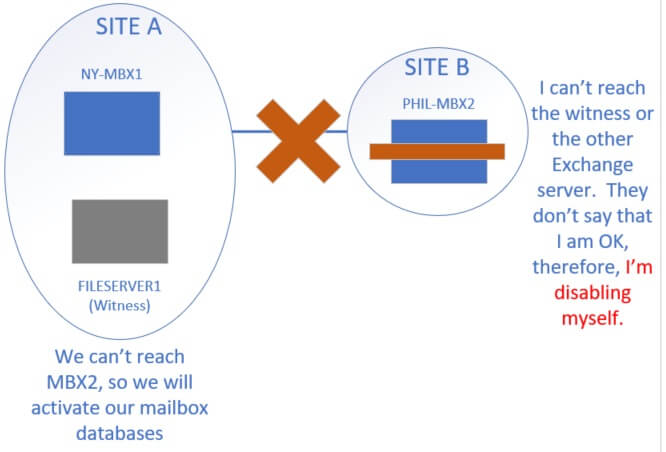
Diagram of what happens when DAG servers are across a WAN link that goes down. The single server will disable itself because it cannot reach the other servers. This is a problem when you want the remote server to serve local clients.
Problem with multiple sites. This is what happens when DAG servers are across a WAN link that goes down. The single server will disable itself because it cannot reach the other servers.
If your SITE-B clients can’t reach SITE-A (because the WAN link is down), they will lose email. This is a significant problem with DAG across multiple sites.
Some organizations handle this problem by letting their users connect to Exchange servers from external (across the Internet) rather than only using internal links.
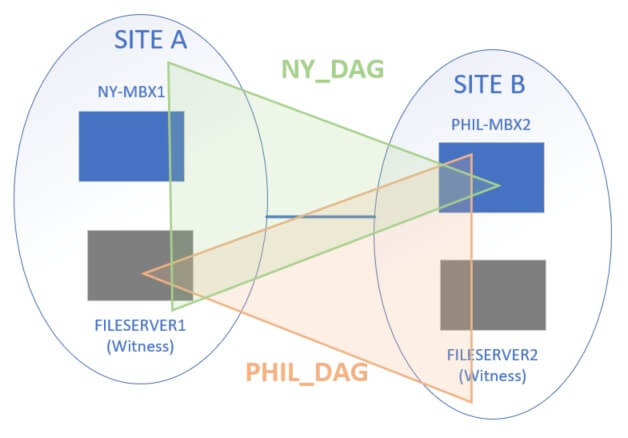
Diagram showing two DAGs across 4 servers. Does not seem to be supported by Microsoft. Would solve the site link problem.
As far as I can tell, this DAG scheme (2 DAGs across 4 servers) is not supported. In my cursory checks of EAC, I don’t see an option to add my Exchange servers to a second DAG. It would be a great solution for the WAN link issue. If you have successfully configured this or a similar solution, please drop a comment and let me know!

Reference links for general DAG information:

Microsoft’s definition of a DAG:  https://docs.microsoft.com/en-us/exchange/high-availability/database-availability-groups/database-availability-groups?view=exchserver-2016

Technet – Designing a DAG, requirements:  https://docs.microsoft.com/en-us/exchange/high-availability/plan-ha?view=exchserver-2016

Practical365 – Concepts and installing: https://practical365.com/exchange-server/exchange-2016-database-availability-groups/

How should I size my Exchange DAG hard drives and CPU / RAM?

Each of your exchange servers needs to be sized to hold all the mailbox databases that are on it.

In most small/medium organizations, all mailbox databases are synchronized over the DAG. In this case, ALL of your exchange servers in the DAG need to be able to hold and run ALL the mailbox databases.

Diagram showing mailbox servers with active and passive databases. Each database is only active on one server.
Each database is only active on one server, but a full copy exists on EVERY server.

Each DAG server should be sized as though the other DAG partners don’t exist.

Example… under normal circumstances, your usage looks like this:

MBX1

  • 1 active database (600 GB)
  • 2 passive databases  (1200 GB)
  • 80 users

MBX2

  • 2 active databases (1200 GB)
  • 1 passive database (600 GB)
  • 160 users

If MBX2 goes offline, the usage will look like this:

MBX1

  • 3 active database (1800 GB)
  • 0 passive databases
  • 240 users

See why you need to build each server as though it is the only server?

For hard drive: You need disk space available to hold full copies of all databases, logs, etc.

For CPU and RAM: You need processing ability to respond to all client connections.

Lesson learned about C: drive space for Exchange

Even if you use a different log drive and database drive, your C: drive space will rapidly grow. A plain vanilla Exchange 2016 server will create logs at a rate of 30-50 GB / month on the C: drive. Once the C: drive reaches about 10-15 GB free, Exchange will disable itself. This is unfortunately less than the critical amount of space for most monitoring programs, so admins don’t get a warning about it. (hooray).

To prevent running out of space on C:, I recommend a 1-2x monthly deletion of logs on the C: drive. You can also configure your server to reduce Exchange logging significantly.

Powershell script (I have not tested this) to remove logs from C: https://social.technet.microsoft.com/wiki/contents/articles/31117.exchange-201320162019-logging-clear-out-the-log-files.aspx

Manual configs to reduce logging, performance data collection, and delete old files: https://cwl.cc/2016/08/exchange-2016-and-reducing-disk-usage-on-the-servers-boot-drive.html

Not copying all mailbox databases?
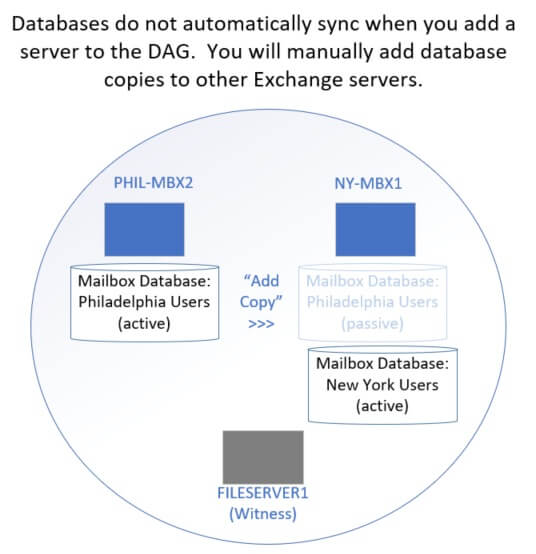
Just adding a server to a DAG will not sync its databases. That is a second manual step.
Just adding a server to a DAG will not sync its databases. That is a second manual step. If you don’t synchronize all databases across your DAG, you don’t need to size for them.

Describing resource requirements is tricky because you don’t have to copy all databases across a DAG.  Some databases can be held on a single host.  If a database isn’t shared, you don’t need to worry about the other servers hosting it.

Configure DNS, Autodiscover for Exchange 2016

Setting up Autodiscover correctly is probably the trickiest part of an Exchange 2016 migration. This is not specific to DAG.

Microsoft- How to set up autodiscover for Exchange 2016: https://docs.microsoft.com/en-us/exchange/architecture/client-access/autodiscover?view=exchserver-2016

If you want users to be able to reach your Exchange servers from external, you will need to open firewall ports on 443 to at least one of your Exchange servers. For failover purposes, I recommend opening at least two of your Exchange servers to port 443.

Then add a round-robin DNS records for each Exchange server. Or at least two of them. Example:

  • Firewall allow 443 67.50.50.4
  • Firewall allow 443 67.50.50.5
  • DNS A 67.50.50.4 MBX1.contoso.com
  • DNS A 67.50.50.5 MBX2.contoso.com
  • DNS CNAME MBX1.contoso.com EMAIL.contoso.com
  • DNS CNAME MBX2.contoso.com EMAIL.contoso.com

Don’t forget to modify the web URLs in EAC to point to your round-robin DNS.

Example: External OWA = EMAIL.contoso.com/owa Internal OWA = MBX1.contoso.com/owa

(Repeat for other Web URLs)

Article that shows how to modify the web URLs: http://www.mustbegeek.com/configure-external-and-internal-url-in-exchange-2016/

Don’t forget to use the Microsoft Remote Connectivity Analyzer tool to verify your DNS, firewall, autodiscover, and and Web URL configs. This really is an Exchange admin’s best friend.

How hard is it to set up a Witness server?

Not hard.  Pretty much any Windows server can do it (Server 2008+).

Most administrators pick an existing file server that is already performing the file sharing role.  Pick a server that won’t be rebuilt anytime soon.

Before you set up the DAG, make sure your witness server will allow management from Exchange.

  1. Ensure Windows Firewall on the witness server allows Windows Management Instrumentation (WMI). Normally if file sharing works, WMI is allowed. I wouldn’t worry about this until you get an error.
  2. “Exchange Trusted Subsystem” is a Local Administrator on the witness server. You will need to do this.  Just go to Computer Management > Local Users and Groups > Groups.   Edit Administrators and add Exchange Trusted Subsystem from your domain.

When you are creating the Database Availability Group using the Exchange Admin Center, the first step of the wizard asks for the DAG Name (pick any name), the witness server ( FILESERVER1.company.com ), the Witness directory ( c:\DAGshare ), and the DAG IP addresses (leave blank for Exchange 2016).

Once the DAG creates successfully, then you can Manage Database Availability Group Membership and add your exchange servers to it. This will not affect clients and does not migrate any mailbox databases yet.

Troubleshooting witness server creation:

Common errors when setting up Witness Server: https://docs.microsoft.com/en-us/exchange/high-availability/manage-ha/manage-dags?view=exchserver-2016

Step-by-step views of creating a DAG and adding member servers:  https://www.vembu.com/blog/configuring-database-availability-group-dag-exchange-2016/

How do I remove my witness server from an existing DAG?

If you have to rebuild or decommission your witness server, no worries.

Common sense: Don’t change your witness server when it is being actively used for quorum. For example, if you have a DAG Exchange server offline, don’t change your witness server until it is working again.

Make sure that the new witness server has firewall rules and permissions set properly.

In EAC (Exchange Admin Center), go to Servers > Database Availability Groups.    Manage your DAG and change the witness server to a new host.  When you save, Exchange should create the new file share and migrate everything over.

Once the DAG is created, sync the mailbox database

Note: Once you add a database copy to another DAG partner, it is in production!

What I mean is that the copy could activate automatically on the new Exchange server. If it activates (because the original server reboots, has network latency, etc), then all your clients are going to automatically fail over to the new server. If the new server doesn’t work, they will have a bad time.

How do I test my DAG servers without impacting clients?

The way I test a new DAG server is to create a new (empty) mailbox database called TEST. I create copies of TEST across all DAG members, and migrate my test account to that mailbox database.

Now I can activate, suspend, failover, etc the TEST database without impacting my regular users.

This is important for testing functionality across multiple servers and sites. For example, clients at SITE-A might not know how to route to SITE-B. It is good to find that out with a test account.

When you are sure that all your clients will communicate correctly with each of the DAG servers, then add the copies of your production databases.

Adding database copies to other servers
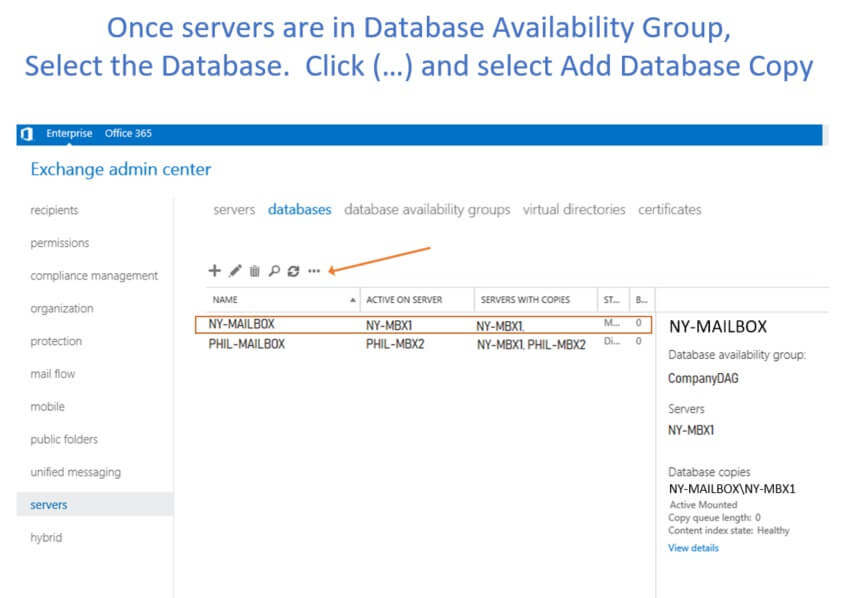
How to add a database copy to other DAG member servers
This will start a wizard which lets you select the server to add a copy to. Depending on your active directory synchronization speed, it may error at this point. Check the troubleshooting article below. Generally, I complete the wizard (even with an error), give it about 20 minutes to sync with active directory, then re-seed the database copy manually.
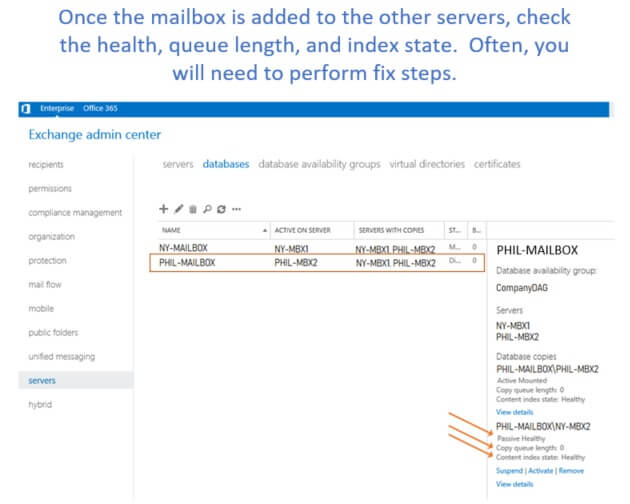
View of EAC showing health statistics for a database copy
If your database health is not good on the the Passive copies, you will see a link to fix them. For example, “Update” will attempt to re-seed a Failed and Suspended database copy.

How to reseed a database copy using EAC: https://practical365.com/exchange-server/how-to-reseed-a-failed-database-copy-in-exchange-server-2013/

How to reseed a database copy using powershell: http://www.thatlazyadmin.com/reseed-mailbox-database-copy/

Note: Make sure you get your SOURCE server correct for these commands. Source = the server that has the active/mounted database copy.

Before you reboot a DAG server – failover and health checks

Even if you are in a maintenance window, I recommend failing over the databases any time you reboot a DAG member.

If you don’t do a manual failover, you will often see sync and index issues after the server is back up.

What happens with clients? Well, assuming your network is good and you’ve tested the client experience on each server already, they shouldn’t even notice that the database failed over. Newer versions of Outlook (Desktop and Phone) will automatically re-point to the active copy.
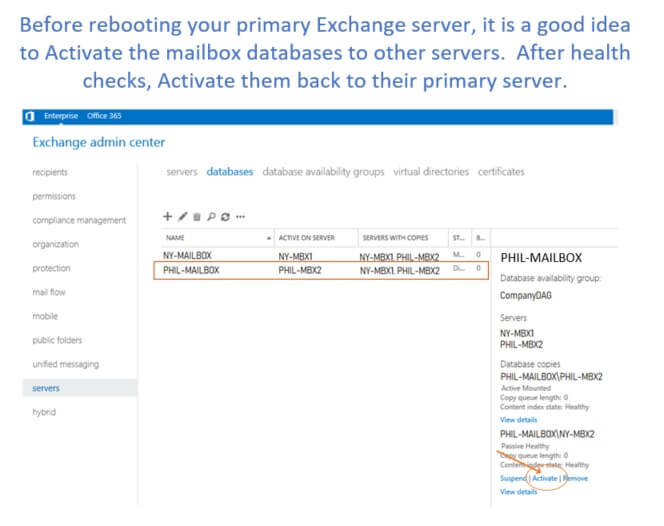

Exchange Admin Center EAC, how to click Activate to fail over the active database.

Cybersecurity data analysis supporting CMMC Level 2 audit preparation for defense contractors

Talk to a CMMC Expert

Tell us where you are with CMMC and we’ll map out the next steps for your team.

Don't miss these

Is Your Security Plan Telling the Truth?
Server room corridor lined with racks in a data center covered by a System Security Plan
Is Your Security Plan Telling the Truth?
What Does the Government Actually Require of You Today?
A network of yellow lines connecting round nodes against a dark background.
What Does the Government Actually Require of You Today?
NIST SP 800-171 Rev 3, What Changed and What It Means for Your CMMC Timeline
Man at a desk in a dark office reading text on a computer monitor, NIST SP 800-171 Rev 3
NIST SP 800-171 Rev 3, What Changed and What It Means for Your CMMC Timeline
CMMC Backup Requirements and The Myths Worth Ignoring
Server backup drives in a dark data center supporting CMMC backup requirements for a defense contractor
CMMC Backup Requirements and The Myths Worth Ignoring
How to Prepare for a DIBCAC High Assessment
Analyst reviewing evidence on dark dual monitors while preparing for a DIBCAC High assessment
How to Prepare for a DIBCAC High Assessment
Out of Scope Assets - What the Final Rule Actually Changed
Abstract data cityscape tied to out of scope assets in a CMMC assessment by Kieri Solutions
Out of Scope Assets - What the Final Rule Actually Changed
CMMC Proposed Rule Analysis - What Defense Contractors Need to Know
Dark cybersecurity image with glowing data illustrating CMMC final rule compliance for defense contractors
CMMC Proposed Rule Analysis - What Defense Contractors Need to Know
CMMC Phase 2 Suspended and What Defense Contractors Need to Know
Analyst reviewing code while working toward CMMC and NIST 800-171 compliance
CMMC Phase 2 Suspended and What Defense Contractors Need to Know
CUI Assets - What Assessors Actually Evaluate
Abstract network of nodes tied to CUI assets and CMMC scope assessed by Kieri Solutions
CUI Assets - What Assessors Actually Evaluate
Do I Even Have CUI? Understanding What You Need to Protect
Abstract data network tied to finding CUI on a defense contractor network with Kieri
Do I Even Have CUI? Understanding What You Need to Protect
Why the DoD Wants Security Protection Data Protected Like CUI
Abstract data network tied to security protection data and CMMC scope assessed by Kieri
Why the DoD Wants Security Protection Data Protected Like CUI
Why Your CMMC Gap Analysis Might Be Worthless - 110 Practices vs 320 Assessment Objectives
Cybersecurity professional conducting CMMC gap analysis for a defense contracting organization
Why Your CMMC Gap Analysis Might Be Worthless - 110 Practices vs 320 Assessment Objectives
Building a CMMC Level 2 Compliant Network You Can Actually Manage
Network architecture visualization for a CMMC Level 2 reference architecture built on Microsoft 365 GCC High
Building a CMMC Level 2 Compliant Network You Can Actually Manage
Why Most CMMC Documentation Fails and How to Fix It
CMMC compliance documentation policies and procedures
Why Most CMMC Documentation Fails and How to Fix It
What Passed a DOD Assessment for System Baselining and Inventories
CMMC system inventory and baseline configuration monitoring dashboard
What Passed a DOD Assessment for System Baselining and Inventories
How to Implement Mobile Code Requirements for CMMC Level 2
CMMC mobile code security controls and technical implementation
How to Implement Mobile Code Requirements for CMMC Level 2
What Does "Monitor" Actually Mean in CMMC Requirements?
CMMC monitoring requirements - access control and password security verification
What Does "Monitor" Actually Mean in CMMC Requirements?
The Version 20 Problem and How to Avoid It
CMMC compliance documentation sequence - cybersecurity program management
The Version 20 Problem and How to Avoid It
Build Your Own CMMC Level 2 Compliant Environment with the Kieri Reference Architecture
CMMC Level 2 compliant environment security controls and access management
Build Your Own CMMC Level 2 Compliant Environment with the Kieri Reference Architecture
Inside the KCD - What Makes This Documentation Different
CMMC compliance documentation templates digital security
Inside the KCD - What Makes This Documentation Different
How the Kieri Compliance Documentation and Reference Architecture Work Together
Kieri Compliance Documentation and Reference Architecture working together for CMMC Level 2 compliance
How the Kieri Compliance Documentation and Reference Architecture Work Together
What's Actually Inside the Kieri Compliance Documentation? A Complete Walkthrough
CMMC compliance documentation and reference architecture security controls - fingerprint scanning and access management
What's Actually Inside the Kieri Compliance Documentation? A Complete Walkthrough
CMMC Assessments by Kieri Solutions
Global cybersecurity compliance support for defense contractors under DFARS
CMMC Assessments by Kieri Solutions
CMMC Education: User vs Network Session Termination
Secure IT infrastructure design supporting CMMC Level 2 compliance for defense contractors
CMMC Education: User vs Network Session Termination
CMMC Proposed Rule has been released! 
Cybersecurity threat - CMMC compliance
CMMC Proposed Rule has been released! 
Interested in the Kieri Compliance Documentation?
Secure data transmission within CMMC compliant network architecture
Interested in the Kieri Compliance Documentation?
How to fix Outlook missing Friday January 13 2023
Interconnected defense contractor networks requiring CMMC Level 2 cybersecurity certification
How to fix Outlook missing Friday January 13 2023
C3PAO Meeting - July 26, 2021 12-1 pm EDT
NIST SP 800-171 DoD Self Assessment Services
DFARS 252.204-7012 and NIST SP 800-171 requirements
NIST SP 800-171 DoD Self Assessment Services
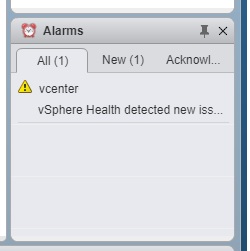
vSphere Health detected new issues in your environment 6.7
vcenter 6.7 alarm displays vsphere health detected new issue
vSphere Health detected new issues in your environment 6.7
vCenter Health Warning: External Platform Services Controller
Synology storage latency and disconnects on VMware
Windows Stuck in Recovery Mode Datto driver signing
Office 365 MFA App Password Missing Fix
Microsoft Teams Conference Calls & Dial-In Numbers
C: Drive Full Exchange
Exchange server very slow, services and network blank
Exchange 2016 DAG - 3 servers 2 sites
Diagram showing mailbox servers with active and passive databases. Each database is only active on one server.
Exchange 2016 DAG - 3 servers 2 sites
Netapp 3rd-party CA certificates expiring DeutscheTelekomRootCA2
Kieri Solutions partnering with defense contractors to achieve CMMC Level 2 certification
Netapp 3rd-party CA certificates expiring DeutscheTelekomRootCA2
vCenter 6.7 Memory Exhaustion and vSphere health (Tiny)
warning vsphere health detected new issue memory exhaustion 6.7 vcenter
vCenter 6.7 Memory Exhaustion and vSphere health (Tiny)
Step by Step: Upgrade vCenter VCSA 6.0 (or 6.5) to 6.7
How to prepare for a DoD CMMC audit and certification
cybersecurity CMMC DoD NIST 800-171 compliance nist 800-53
How to prepare for a DoD CMMC audit and certification
Fix Expired vCenter Root Password (6.5 & 6.7)
How to rename Windows Server 2016 Domain Controller
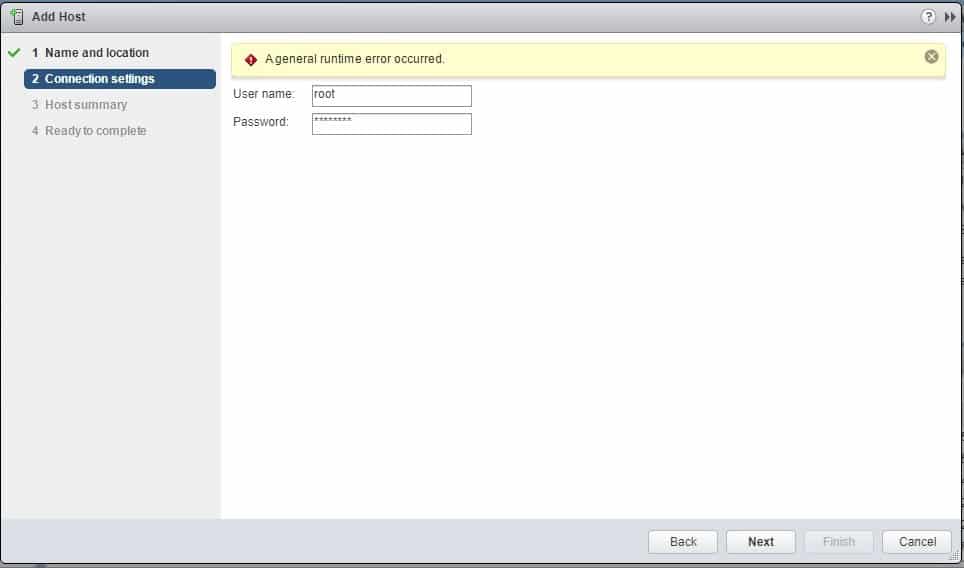
Runtime Error Adding Host in VMware vCenter & ESXi
add host a general runtime error occurred vcenter 6.5 6.7
Runtime Error Adding Host in VMware vCenter & ESXi
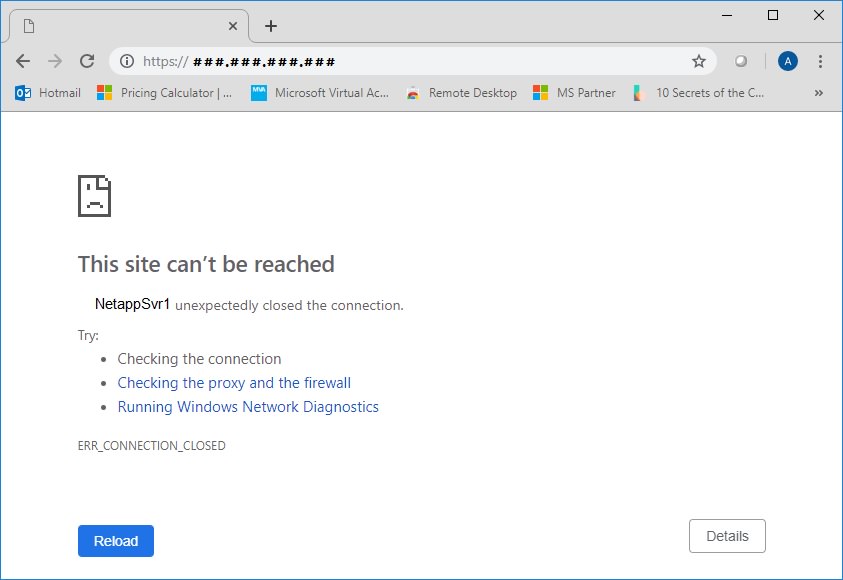
How to fix Netapp expired self-signed certificate by creating a new one
netapp certificate expired install site cant be reached
How to fix Netapp expired self-signed certificate by creating a new one
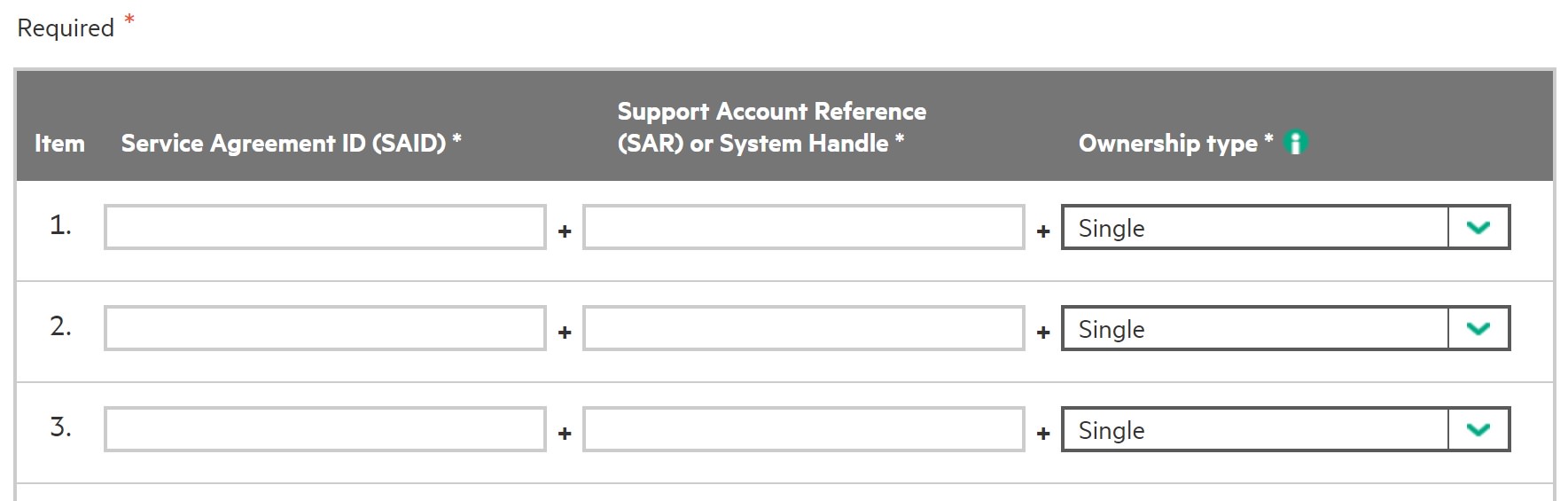
How to register a warranty or service agreement on HPE website
hpe hp register account SAR ID service agreement warranty how accept
How to register a warranty or service agreement on HPE website
How to install vCenter 6.7 (and 6.0 and 6.5) with no DNS, only IP address
vcenter ip address no dns
How to install vCenter 6.7 (and 6.0 and 6.5) with no DNS, only IP address
How to disable continuous scrolling on Kindle - turn on page flip
disable continuous scrolling option displays
How to disable continuous scrolling on Kindle - turn on page flip
17hats how to export or convert to Excel CSV TAB XLS workbook
17hats export convert iff to csv tab excel
17hats how to export or convert to Excel CSV TAB XLS workbook
How to fix "Cannot apply changes to this Internet Shortcut" Windows
cannot apply changes to this internet shortcut 2016 2019
How to fix "Cannot apply changes to this Internet Shortcut" Windows
Best Free Computer Incident Response Templates and Scenarios
best free incident response reporting form cybersecurity IT
Best Free Computer Incident Response Templates and Scenarios
Firmware & System Patching Services | DC & Maryland
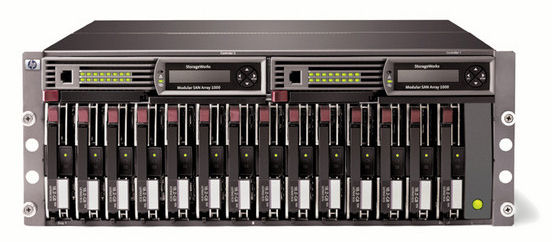
poweredge server raid reconfigure add disks 1 5
Firmware & System Patching Services | DC & Maryland
Network hardening near Baltimore MD, Frederick, Rockville, Gaithersburg and DC
Best practice network segmentation and hardening prevents pivot attacks NIST
Network hardening near Baltimore MD, Frederick, Rockville, Gaithersburg and DC
VMware vSphere ESX and vCenter Upgrade 5.5 to 6.0 or 6.5 or 6.7 best practices
Best practices and how to install esxi vsphere vcenter vmware and troubleshooting problems during the migration
VMware vSphere ESX and vCenter Upgrade 5.5 to 6.0 or 6.5 or 6.7 best practices
Disaster Recovery & Business Continuity in DC & Maryland
disaster recovery drp bcp hipaa frederick columbia gaithersburg baltimore rockville
Disaster Recovery & Business Continuity in DC & Maryland
VMWare and Netapp consultant in DC, Baltimore, Columbia, Frederick, and Rockville MD
installation services netapp disk shelf baltimore columbia rockville
VMWare and Netapp consultant in DC, Baltimore, Columbia, Frederick, and Rockville MD
SBDC - Intro to GDPR training - Frederick MD
intro gdpr overall sbdc fitci frederick
SBDC - Intro to GDPR training - Frederick MD
GDPR and Human Resources
cybersecurity cyber security hardening compliance firewall design frederick
GDPR and Human Resources
No, your computer isn't slow.
why slow computer pc repair frederick damascus mt airy md
No, your computer isn't slow.
Why you should consider a credit freeze - EquiFax hack
credit freeze equifax hack how to breach innovis
Why you should consider a credit freeze - EquiFax hack
Virtual Servers, Storage, and SAN - Why your servers are slow
cybersecurity compliance design consulting engineering
Virtual Servers, Storage, and SAN - Why your servers are slow
How to un-freeze your laptop like a pro
pc or computer problem repair damascus lisbon mt airy laytonsville
How to un-freeze your laptop like a pro
Upgrade your IT Services for the New Year
managed services it department outsource company frederick columbia germantown gaithersburg
Upgrade your IT Services for the New Year
Dell PowerEdge R730 PERC RAID online reconfiguration
poweredge server raid reconfigure add disks 1 5
Dell PowerEdge R730 PERC RAID online reconfiguration
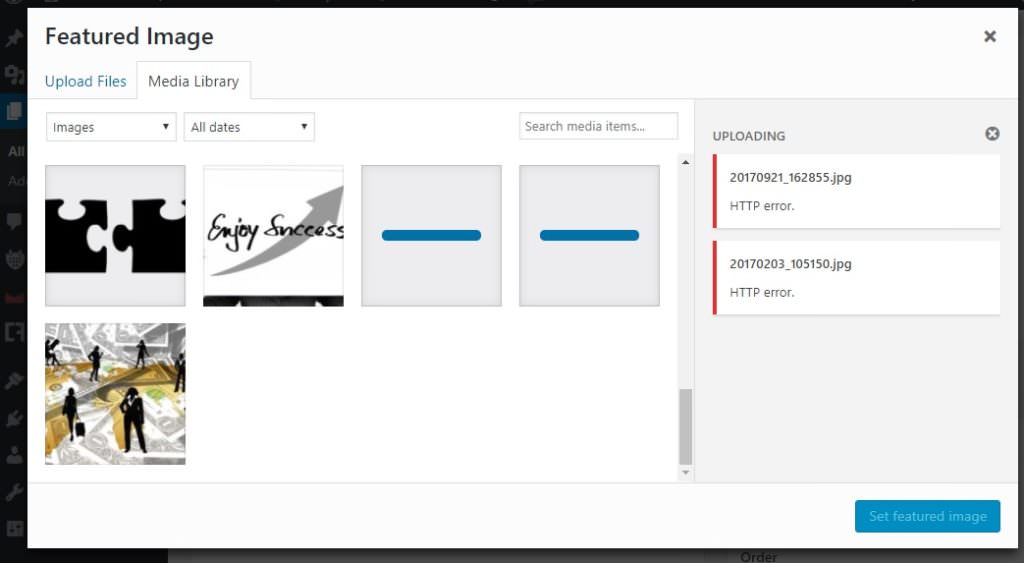
Dreamhost HTTP error Wordpress media upload and library
dreamhost http error picture disappear upload shared wordpress
Dreamhost HTTP error Wordpress media upload and library
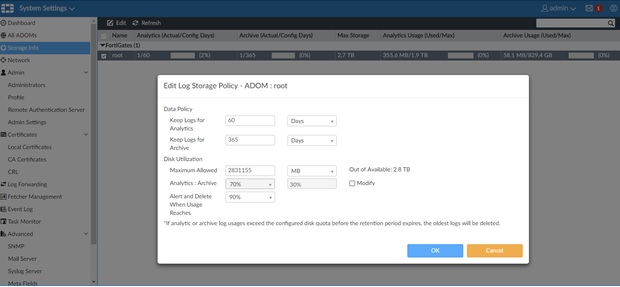
FortiAnalyzer Configuration problems after initial deploy
FortiAnalyzer 5.4 Storage Quota Limits for ADOM root
FortiAnalyzer Configuration problems after initial deploy
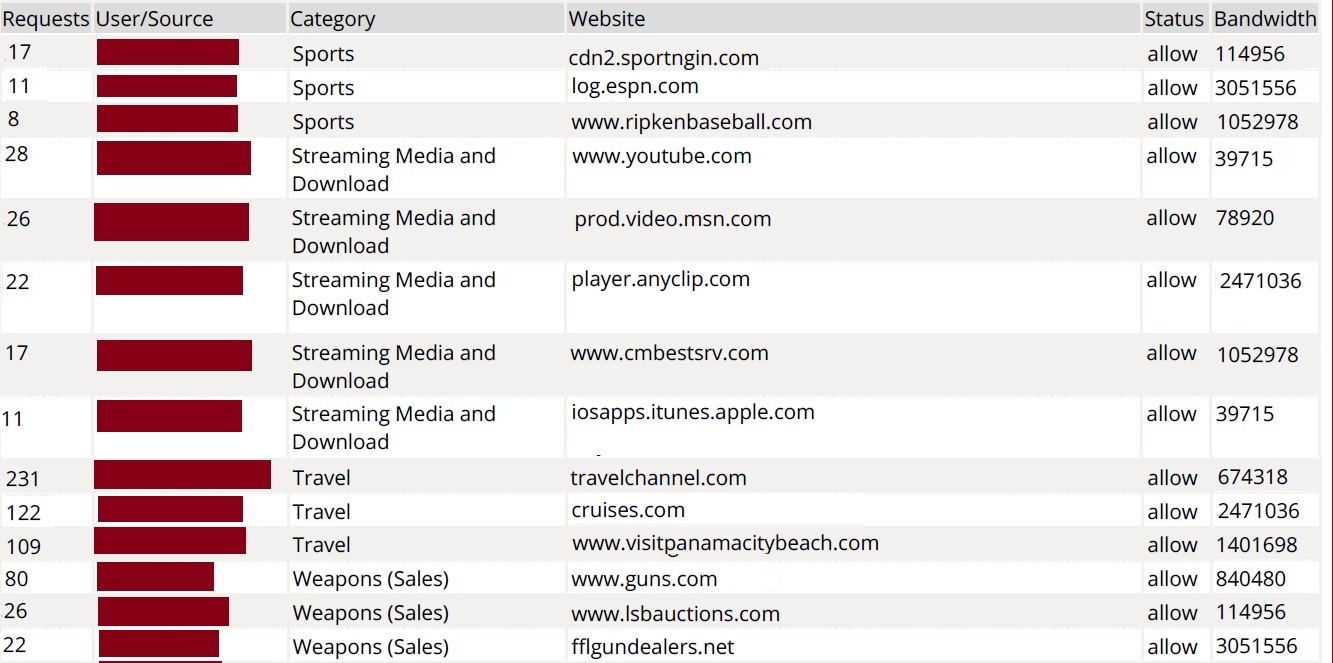
FortiAnalyzer Report: User Web Browsing by Category
fortianalyzer custom report users by category who is browsing web goofing off
FortiAnalyzer Report: User Web Browsing by Category
GDPR Consulting - What you need to know
cybersecurity CMMC DoD NIST 800-171 compliance nist 800-53
GDPR Consulting - What you need to know
The #1 Computer Security Threat Just Evolved - RCE Worm
cybersecurity cyber security compliance firewall frederick md
The #1 Computer Security Threat Just Evolved - RCE Worm
Fix vSphere & vCenter Datastore Size Reverting
security design cybersecurity consulting services compliance
Fix vSphere & vCenter Datastore Size Reverting
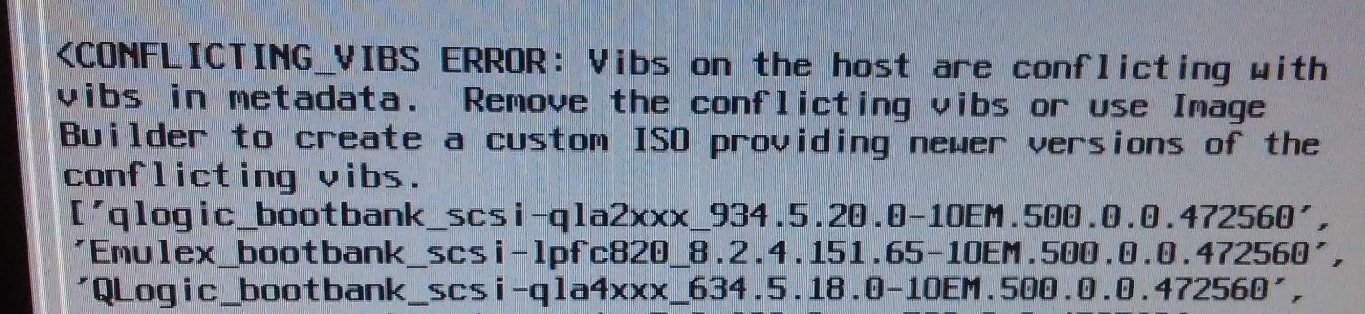
HP DL360p g8 ESXi 5.5 to 6.5 upgrade conflicting_vibs_error
conflicting vibs error vsphere upgrade metadata consultant vmware
HP DL360p g8 ESXi 5.5 to 6.5 upgrade conflicting_vibs_error
Is your IT person holding the network hostage?
Server Upgrade Cybersecurity Consultant SAN Netapp Frederick
Is your IT person holding the network hostage?
4 Hiring Mistakes When Choosing an IT Company
mistakes when hire IT consultant MSP managed service provider computer support outsourcing
4 Hiring Mistakes When Choosing an IT Company
What you should know about Cloud Computing and Office 365
cloud IT department migration Office 365 Frederick Baltimore Columbia MD
What you should know about Cloud Computing and Office 365
Can You Make Our Nation Safe from Hackers?
The Ultimate Way to Protect Against Computer Theft
Kieri Solutions site icon
The Ultimate Way to Protect Against Computer Theft
Small / medium business security concerns
managed services it department outsource company frederick columbia germantown gaithersburg
Small / medium business security concerns
Approaches to security policy
cybersecurity cyber security hardening compliance firewall design frederick
Approaches to security policy

Article

Is Your Security Plan Telling the Truth?
Server room corridor lined with racks in a data center covered by a System Security Plan

Article

What Does the Government Actually Require of You Today?
A network of yellow lines connecting round nodes against a dark background.

Article

NIST SP 800-171 Rev 3, What Changed and What It Means for Your CMMC Timeline
Man at a desk in a dark office reading text on a computer monitor, NIST SP 800-171 Rev 3

No one wants to start from blank templates.

No one wants to start from
blank templates.

Stop starting from blank templates. Get documentation proven through actual CMMC Level 2 assessment.