Boundaries, VDI clarifications, and the end of SPA chaining
Understanding what’s out of scope matters as much as knowing what’s in scope.
The final CMMC rule made significant clarifications about boundaries, VDI endpoints, and security protection asset relationships. These changes simplify scoping and eliminate some of the more problematic interpretations from earlier guidance.
This article covers what makes assets out of scope, how to justify that status, and the practical implications for your CMMC assessment.
The Out of Scope Definition
Out of scope assets meet two criteria:
They CANNOT process, store, or transmit CUI
They do NOT provide security protections for CUI assets
Both conditions must be true. An asset that could reach CUI but isn’t meant to, and doesn’t provide security, is still potentially in scope. That’s usually a CRMA. But if the asset can reach CUI, is meant to, and nothing stops it, then it’s a CUI asset, not a CRMA. An asset that provides security for CUI assets is in scope regardless of whether it handles CUI directly. That’s a Security Protection Asset, or SPA.
The scoping guide adds important clarification: assets that are physically OR logically separated from CUI assets and don’t provide security protections are out of scope.
Physical separation is straightforward—different buildings, different rooms with controlled access, different geographic locations.
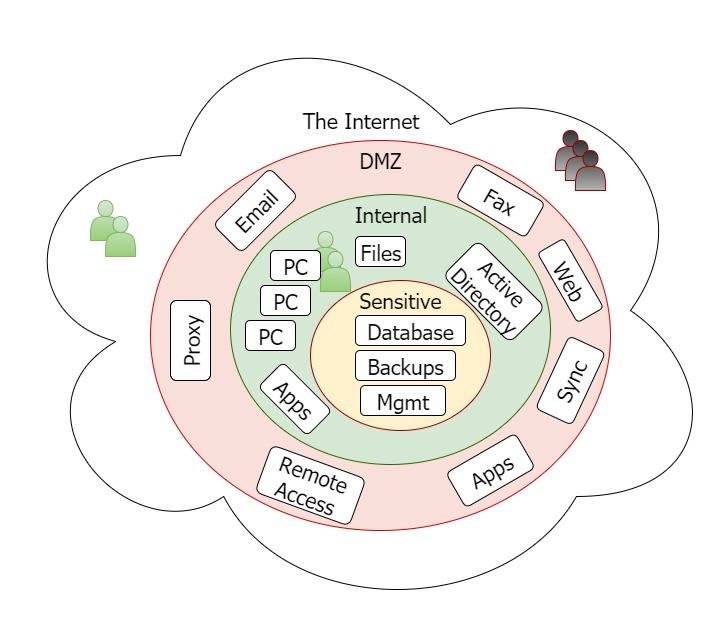
Logical separation requires boundaries. Deny-by-default firewalls. Separate networks with no routing between them. Technical controls that prevent communication.
If an asset falls into ANY in-scope category (CUI asset, security protection asset, contractor risk managed asset, or specialized asset), it cannot be out of scope by definition.
The SPA Chaining Problem—Solved
Before the final rule, security protection asset scoping created absurd situations.
Previous language said SPAs providing security for “anything in CMMC scope” were in scope. This created chains:
CUI asset → protected by SPA #1 → protected by SPA #2 → protected by SPA #3 → protected by SPA #4
You could end up four networks away, across multiple companies, trying to assess whether a log server had MFA configured. The connection to actual CUI became impossibly distant.
The final rule fixed this with crucial clarification: only SPAs providing security FOR CUI ASSETS are in scope.
Now we follow security relationships one link away from CUI. The antivirus server protecting your CUI file server? In scope. The log server collecting logs from that antivirus server? Not automatically in scope just because of that relationship.
This change dramatically simplifies scoping for organizations with complex security architectures.
VDI Endpoint Clarification
Virtual Desktop Infrastructure creates interesting scoping questions. You’re accessing CUI through a remote session, but the device in front of you might be a personal laptop or a thin client.
The final rule provides welcome clarity: if your VDI session prevents processing, storage, or transmission of CUI beyond keyboard, video, and mouse signals, the client endpoint is out of scope.
Configuration requirements:
No copy/paste between VDI session and local device
No printing to local printers
No saving to local C: drive
No saving to USB or thumb drives
Only keyboard input and screen output crossing the boundary
If you’ve locked down the session properly, the device connecting to VDI is out of scope.
Why? Because DOD said so. Sometimes that’s the best answer we get, and we’ll take it.
This clarification helps organizations that want to use BYOD devices or thin clients for CUI access without bringing those endpoints fully into scope.
Administrative Controls Don’t Take Assets Out of Scope
Some people hope that policy and training alone can push an asset out of scope. If users are told not to put CUI on a system, doesn’t that keep it out?
No. And this is Kieri’s position on the issue.
An asset goes out of scope through technical or physical separation. A deny-by-default firewall. A separate network with no routing to CUI. A different building. Administrative controls by themselves don’t create that boundary.
That doesn’t make administrative controls useless. They do real work, just not the work of removing assets from scope.
Training that teaches users not to put CUI on personal devices. Policies that define which systems handle CUI. Procedures that specify approved transmission methods. These help you manage and reduce risk on assets that are already in scope.
This is where the CRMA category lives. A Contractor Risk Managed Asset could reach CUI but isn’t intended to, and you manage that risk with policy and process. But a CRMA is still in scope. You’ve reduced the risk, not eliminated the asset from your assessment.
So use administrative controls to strengthen how you handle in-scope assets. Just don’t expect them to shrink your boundary. For that, you need technical or physical separation you can point to during your scoping call.
Justifying Out of Scope Status
During assessment planning, you’ll have a scoping call with your assessors. This conversation establishes what’s in scope and what’s not.
Be prepared to explain why assets are out of scope:
What boundary separates them from CUI?
Is it a firewall? Separate network? Different building?
Can users on that system access CUI systems?
Does that asset provide any security functions for CUI?
If something seems like it should be in scope from an external viewpoint—another network in your company, for example—have your justification ready.
“That network handles FCI but not CUI. There’s no routing between that network and our CUI enclave. Users on that network cannot access CUI systems. It doesn’t provide security functions for our CUI assets.”
Clear, specific justifications make scoping calls efficient.
Once you establish something is out of scope during that call, assessors won’t examine it. But the initial justification matters.
You Can Choose Your Assessment Scope
Here’s something many contractors don’t realize: you don’t have to put all CUI in your entire company into scope.
You can say “assess this enclave, not that other area.”
Valid reasons include:
Technical debt: Legacy systems from 20 years of accumulated work that will break if you apply security. Building a new secure network and wanting to certify it before migration.
Contract-specific CUI: Different contracts handled on different systems. Assessing one enclave for one contract while keeping another separate.
Staged implementation: Proving one environment works before expanding scope.
Assessors won’t certify more than what they assess. Your certification applies to the assessed scope, not your entire organization.
But be careful: don’t get certified on one network then use an unassessed network for the contract work. That creates False Claims Act exposure. The certification covers what was assessed, nothing more.
MSP vs Subcontractor Distinctions
How do relationships with other companies affect your scope?
Managed Services Providers are in scope when they manage your CUI systems. Not partially. If your MSP’s system administrator manages your servers, that administrator’s access makes those assets a security protection asset for your environment. Their antivirus server protecting your endpoints is in scope too.
What matters is which of the MSP’s assets touch your CUI environment. The ones that manage or protect your CUI systems are in scope. The ones that don’t aren’t.
The clarification about SPAs for CUI assets helps here. If the MSP’s antivirus server only protects their internal systems and not your CUI assets, it stays out of scope for your assessment.
Subcontractors are different. A subcontractor directly contributes to your contract deliverable. The aluminum supplier for your airplane wings. The heat treating company. Engineering firms helping design components.
Subcontractors generally aren’t in scope for your assessment. They need their own CMMC certification for how they handle CUI. But their certification status is their responsibility, not something your assessors examine as part of your assessment.
Vendors providing services unrelated to your deliverable, like IT support, HR services, or janitorial, are generally out of scope unless they handle CUI or provide security functions for your CUI systems.
Mobile Device Scoping
Phones and tablets create scoping questions.
If a phone only accesses email through a cloud service with strong boundaries, and email doesn’t contain CUI, the phone is likely out of scope. The connection goes to the cloud, not directly to CUI systems.
If a phone has VPN access to your CUI network? Now we’re looking at CRMA or potentially CUI asset depending on configuration.
If a phone can only access a limited email connection through your firewall with no ability to reach CUI? Probably out of scope.
These determinations require examining the actual data flows and access capabilities. “It’s a phone” doesn’t automatically mean anything for scoping—the connections and capabilities matter.
Practical Scoping Call Preparation
Before your scoping call with assessors:
Document your boundaries. What firewalls separate your CUI environment from other networks? What rules do they enforce?
Map your relationships. What MSPs have access to your systems? What security tools run in your environment? Where do they connect from?
Identify questionable items. What might look in-scope from outside but you believe is out of scope? Prepare your justification.
Know your VDI configuration. If you’re using VDI, document exactly what data can and cannot cross the session boundary.
Clarify your scope request. Are you assessing all CUI or specific enclaves? Be clear about what you want certified.
Good preparation makes scoping calls efficient and prevents assessment scope creep.
Kieri Solutions helps defense contractors establish clear scope boundaries and prepare for assessment scoping calls. We’ve conducted dozens of scoping discussions and know what justifications work.