Real evidence from a successful CMMC Level 2 assessment that you can learn from
Practice 3.4.1 looks simple on the surface. Establish and maintain baseline configurations and inventories of organizational systems.
Then you read the assessment objectives. Hardware, software, firmware, and documentation. For both baselines AND inventories. Maintained over time. Reviewed periodically.
Suddenly you’re looking at one of the most complex practices in CMMC Level 2.
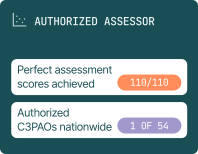
We interviewed Steve Pratt from SENTAR, an authorized C3PAO that passed their own DIBCAC assessment, to understand exactly what they showed assessors and what worked.
The First Thing Assessors Request During Scoping
Before your assessment even begins, you’ll have a scoping call. During that call, assessors request two things immediately: your system inventory and your scoping diagram.
Here’s the critical part. They compare them.
If a device appears in your diagram but not your inventory, that’s an immediate red flag. If something is in your inventory but missing from your diagram, same problem.
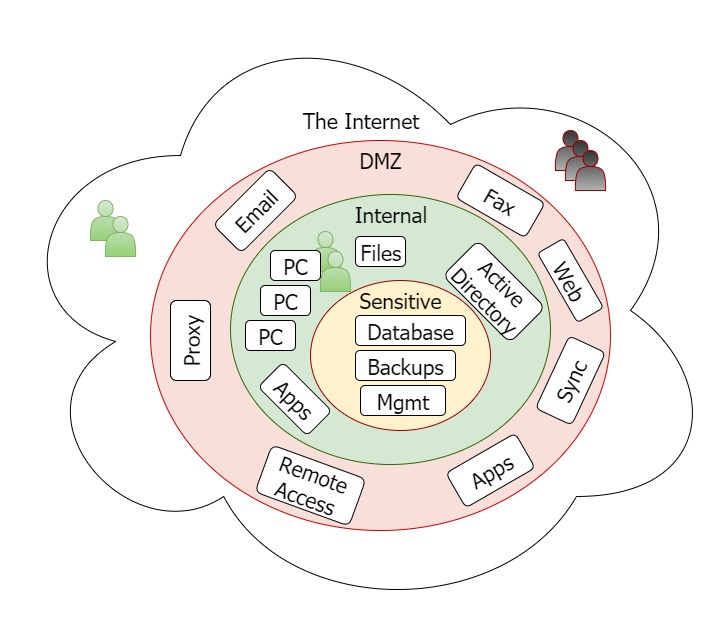
Your inventory and your scoping diagram must match exactly. Every device that processes, stores, or transmits CUI needs to appear in both places with consistent information.
Categorizing Devices by CMMC Scoping Guide
Many organizations have robust system inventories. They track hardware, software, and device owners. They scan networks and maintain accurate records.
But they haven’t categorized devices according to the CMMC scoping guide.
Is this a CUI Asset? Is it a Security Protection Asset? Is it a Contractor Risk Managed Asset? Is it a Specialized Asset?
These categories come directly from the CMMC scoping guide. Assessors expect to see them. Organizations that haven’t done this categorization often think they’re ready for assessment when they’re not.
Before your scoping call, go through every device in your inventory and assign the appropriate category from the scoping guide.
How SENTAR Built Their System Inventory
SENTAR used their help desk software as the foundation for their system inventory. The software includes network scanning capability that discovers devices automatically.
Automated Discovery with Manual Control
The scanning feature finds devices on the network and gathers information automatically. Hardware details, software installed, firmware versions. This creates a baseline inventory without manual data entry for every device.
But automated discovery isn’t perfect. Sometimes it misses devices. Sometimes it sees one device as two separate entries (like when a laptop connects via both WiFi and ethernet).
SENTAR’s system allows manual modification. They can add devices the scanner missed. They can merge duplicate entries. They can correct information the scanner got wrong.
This combination of automated discovery and manual control creates accurate inventories without excessive administrative burden.
Tying Devices to Owners
Every device in their inventory connects to an owner. This isn’t just good practice for asset management. It supports CMMC requirements around accountability and access control.
When assessors ask who’s responsible for a particular device, you need an answer. Your inventory should provide it.
Showing the Inventory is Maintained
Static inventories don’t satisfy CMMC requirements. You need to demonstrate that the inventory stays current as your environment changes.
SENTAR showed evidence in two ways.
For additions, they demonstrated how new devices appear automatically when connected to the network. The system prompts administrators to confirm whether new devices are authorized and should be added to the inventory.
For removals, they showed system logs documenting when devices were retired and removed from the inventory. The audit trail proves ongoing maintenance.
What About Hardware, Software, Firmware, and Documentation?
The assessment objectives mention hardware, software, firmware, and documentation for system inventories. Many organizations struggle with how to address all four.
Hardware, Software, and Firmware in Inventory
SENTAR showed their inventory includes hardware details (device type, model, specifications), software installed on each device, and firmware versions for network equipment.
Their help desk software captures much of this automatically through scanning. Administrators supplement with manual entries where needed.
Documentation in Inventory
Here’s good news. SENTAR’s DIBCAC assessors didn’t strictly require documentation as part of the system inventory.
Documentation can mean policies applying to devices, best practices documents, or user manuals. Including all of this in a system inventory is challenging.
In practice, documentation often fits better with baselines than with inventories. Your baseline documentation explains how devices should be configured. Your inventory tracks what devices exist.
If your assessor asks about documentation in your inventory, be prepared to explain your approach. But don’t assume you need elaborate documentation linked to every inventory entry.
Creating Baseline Configurations That Work
Baselines describe how systems should be configured. But what exactly does that mean in practice?
One Baseline Per Device Type
SENTAR doesn’t create individual baselines for each of their laptops. They create one baseline for each device type and operating system combination.
All Windows 10 laptops share one baseline. If they had Windows 11 laptops, those would have a separate baseline.
This is practical and scalable. You’re not maintaining dozens or hundreds of separate baseline documents. You’re maintaining baselines for each category of device.
Supplemental Baselines for Server Roles
Servers add complexity because they serve different functions. A file server has different configuration requirements than an Exchange server or a SharePoint server.
SENTAR handles this with layered baselines. Every server gets the base server baseline for that operating system. Then it gets a supplemental baseline for its specific role.
The base baseline covers configurations common to all servers. The supplemental baseline covers role-specific settings.
This approach keeps documentation manageable while still capturing the unique requirements of each server type.
Scripts and Installers in Baselines
When building a new system, you might run scripts or installers to apply configurations. Are these part of your baseline?
SENTAR’s approach: if the script remains on the system after deployment, it’s part of the baseline documentation. If the script runs once during setup and then gets removed, it’s captured in the procedure for applying baselines rather than the baseline itself.
Either way, the configuration change gets documented. The difference is where that documentation lives.
What Does a Baseline Actually Look Like?
This question seems basic but trips up many organizations. What format should baselines take?
Images as Baselines
The classic baseline is a system image. You configure a device correctly, capture an image, and use that image to deploy new devices. The image IS your baseline.
For virtual servers, SENTAR uses snapshots as their baseline starting point. Every new virtual server begins from the approved snapshot.
For network devices like switches and firewalls, they export configuration files. The exported config is the baseline. If they need to rebuild or replace the device, they import that configuration.
Checklists as Baselines
Not every organization can maintain images for every device type. Gold images require infrastructure to store and deploy. Some environments don’t support this approach.
SENTAR uses a checklist approach for some baselines, particularly for configurations applied after initial deployment.
The checklist documents every setting that gets changed from the default. Disable these services. Enable these features. Apply these settings. Close these ports.
If someone else needed to configure an identical device, they could follow the checklist and achieve the same result.
Assessors will accept checklists as a rudimentary form of baseline. It’s not ideal, but it meets the requirement if the checklist is thorough and accurate.
Group Policy as Part of Baselines
For Windows environments with Active Directory, group policy handles many configuration settings automatically.
SENTAR includes group policy in their baseline approach. Once a laptop joins the domain and gets added to the correct organizational unit, group policy applies standardized configurations.
This works well for ongoing compliance. Devices stay configured correctly because group policy enforces it. But you still need documentation explaining what group policy settings apply and why.
The Formal Baseline Review Process
Baselines can’t be static. Software updates, security patches, and changing requirements mean baselines need periodic review.
Annual Formal Review
SENTAR performs a formal baseline review annually. This scheduled review examines whether baselines remain appropriate and identifies needed updates.
Annual review satisfies the “maintained” aspect of the requirement. You’re not just creating baselines once. You’re actively managing them over time.
Version-Change Updates
Major software or firmware version changes trigger baseline updates outside the annual cycle. Moving from one Windows version to another, upgrading firewall firmware, or deploying new server software all require baseline updates.
These updates go through change management. The change board reviews and approves baseline modifications before they’re implemented.
Patch-Level Tracking
SENTAR updates baseline documentation for patch levels but doesn’t require full change board review for routine patches.
This is a practical distinction. Running a formal change process for every monthly Windows patch would create administrative burden without proportional security benefit. But you still want baseline documentation to reflect current patch levels.
What Assessors Actually Verified
Understanding what assessors check helps you prepare appropriate evidence.
Documentation Review
Assessors reviewed SENTAR’s baseline documentation. They wanted to see that baselines existed, were documented, and covered the required elements.
They also reviewed procedures for applying baselines to new systems. How do you ensure a new laptop matches the baseline? What’s the process for deploying a new server?
Random Device Verification
Assessors randomly selected devices to verify against baselines. For SENTAR, this included two or three laptops, two servers, and a switch.
They compared actual device configurations to baseline documentation. Do the settings on this laptop match what your baseline says they should be?
This is why accurate, current baselines matter. Assessors will check actual devices. If reality doesn’t match documentation, you have a problem.
Evidence of Maintenance
Assessors wanted evidence that inventories and baselines are maintained over time. System logs showing device additions and removals. Change management records for baseline updates. Annual review documentation.
Static documents created for the assessment don’t satisfy this. You need ongoing processes with audit trails.
Practical Tips from the Interview
Blow Away All Partitions When Reimaging
Steve shared an important lesson from a previous incident. Malware sometimes copies itself to recovery partitions that vendor-imaged systems include.
You might completely wipe and reimage a system, but if the malware copied itself to the Dell or HP recovery partition, it comes back after reimaging.
The solution: don’t just reimage. Delete all existing partitions first. Start completely fresh. This prevents malware from surviving in hidden partitions.
Remove Bloatware and Close Unnecessary Ports
Vendor-imaged systems come with extra software you don’t need. Trial applications, vendor utilities, promotional content.
Your baseline process should remove this bloatware. It should also close ports you don’t use and disable services you don’t need.
Assessors may accept a process that starts with vendor images and applies documented hardening. But they might note this as an opportunity for improvement compared to building from clean images.
Understand the Minimum Bar
Steve emphasized reading assessment objectives literally. Assessors should verify what the objectives say, not more.
Some organizations over-engineer their baselines, creating elaborate systems when simpler approaches would pass. Others assume requirements are more lenient than written.
The assessment objectives define the bar. Understand exactly what they say. Meet that standard. Don’t assume you need to exceed it, but don’t assume you can fall short either.
Baselines Cover Functionality and Security
Baselines aren’t just about security configurations. They’re about ensuring every system of a given type is configured identically.
This helps with troubleshooting, support, and management. When you know every Windows 10 laptop is configured the same way, you can diagnose problems faster. You can provide consistent support. You can manage systems efficiently.
Security configurations are part of baselines. But so are functional configurations that make systems work correctly and consistently.
Common Mistakes with System Baselining
Inventory Doesn’t Match Scoping Diagram
This is the most immediate problem assessors will catch. If your inventory and diagram don’t align, you’ll need to explain why.
Before your scoping call, compare these documents. Make sure every device appears in both places with consistent information.
Missing Device Categorization
Having a detailed inventory isn’t enough. Each device needs a category from the CMMC scoping guide. CUI Asset, Security Protection Asset, Contractor Risk Managed Asset, or Specialized Asset.
Assessors expect this categorization. Organizations that haven’t done it often think they’re ready when they’re not.
Baselines That Don’t Match Reality
Creating baseline documentation is one thing. Ensuring actual devices match that documentation is another.
Assessors randomly verify devices. If your laptops aren’t actually configured to your documented baseline, that’s a finding.
Review your baselines against actual devices before assessment. Fix any discrepancies.
No Evidence of Ongoing Maintenance
Static documents suggest baselines and inventories were created for the assessment rather than being part of normal operations.
You need evidence of ongoing maintenance. Change management records. System logs. Annual review documentation. Audit trails showing additions and removals over time.
Build these processes before assessment. Let them run long enough to generate meaningful evidence.
Getting Your Baseline Documentation Right
System baselining is one of the more complex CMMC practices. The assessment objectives cover a lot of ground. Getting it right requires understanding both what’s required and what assessors actually verify.
Schedule a consultation to discuss your specific baselining questions with Certified CMMC Assessors.
Watch our full interview to hear exactly what worked for SENTAR’s successful DOD assessment.
Kieri Solutions is one of 54 authorized C3PAOs in the United States. Our team of Certified CMMC Assessors helps defense contractors understand exactly what evidence assessors expect for complex practices like system baselining.