

CUI Identification and Handling for Defense Contractors
Before you can meet NIST SP 800-171 or get CMMC certified, you need to know what you’re protecting and where it lives. Controlled Unclassified Information is the government information the CMMC program was built to protect. Knowing what counts as CUI, where it sits in your systems and how to mark it shapes every other compliance decision you make.
- CUI is government information that needs protection under a law, regulation or governmentwide policy but isn’t classified. Your contract and program office decide what counts.
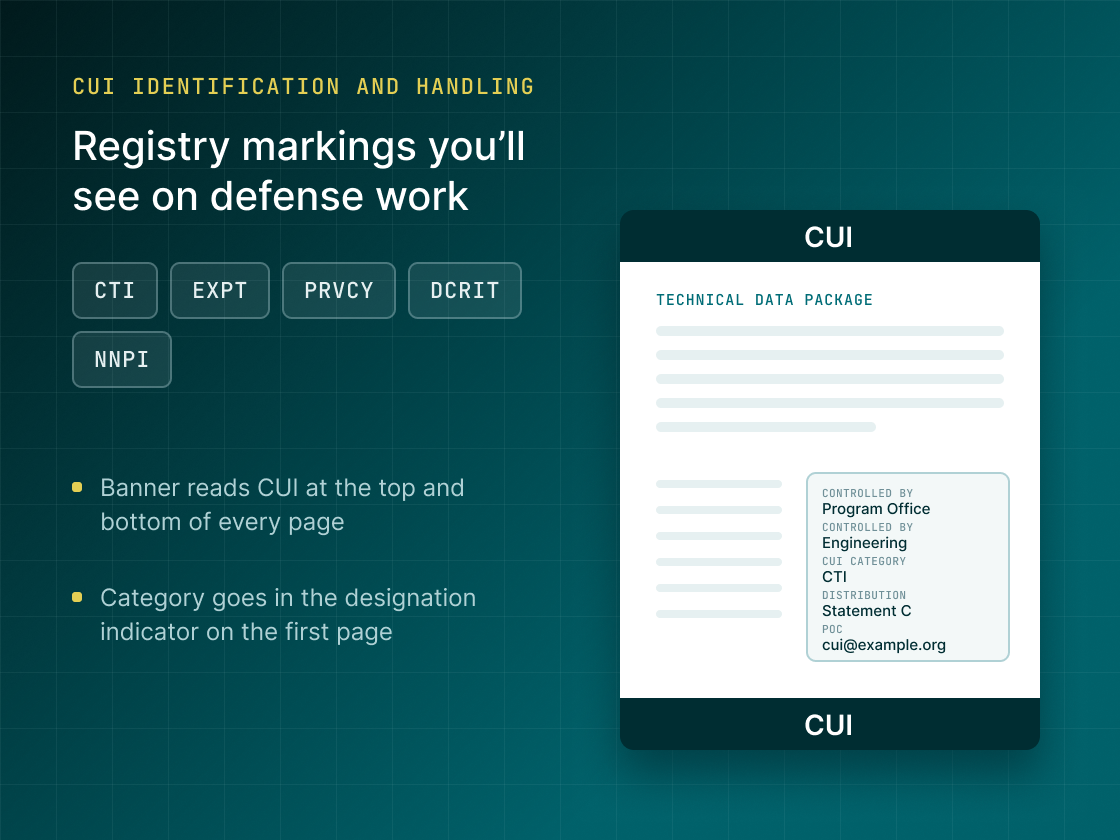
- In DoW documents the banner reads CUI at the top and bottom of every page, and the category goes in the designation indicator on the first page.
- Your CMMC assessment boundary follows wherever CUI goes, so map how it enters, moves and leaves before you scope anything.
What CUI is and where the rules come from
Controlled Unclassified Information is information the government creates or owns that needs safeguarding or limits on who sees it, under a law, regulation or governmentwide policy, but that doesn’t meet the bar for classification. Executive Order 13556 set up the CUI program in 2010, and 32 CFR Part 2002 put it into regulation in 2016. The National Archives runs the program and keeps the CUI Registry, which lists every category, its legal authority and how to mark it.
Before CUI, the same kinds of information went by names like FOUO and Sensitive But Unclassified. The CUI program replaced those labels with one system. For defense contractors, DFARS 252.204-7012 makes NIST SP 800-171 a contract requirement for any system that processes, stores or transmits covered defense information. CMMC adds a way to check that those requirements are in place.
What isn’t CUI
A lot of confusion about CUI comes from mixing it up with other kinds of information that have their own rules.
Classified information
Classified information needs a security clearance and falls under the National Industrial Security Program. CUI doesn’t need a clearance. Some contractors handle both, but the laws and handling rules for each are separate.
Federal Contract Information
FCI is information provided by or created for the government under a contract that isn’t meant for public release. It shows up in almost every federal contract and needs the basic safeguards in FAR 52.204-21, which is CMMC Level 1. CUI needs the full NIST SP 800-171 program at CMMC Level 2. Some FCI is also CUI, but plenty isn’t.
Public information
If the government has released information to the public, or anyone can get it from a public source without restriction, it isn’t CUI. Marking public information as CUI doesn’t add protection and makes it harder for people to tell what needs care.
Your own proprietary information
Your pricing, methods and internal processes generally aren’t CUI unless they contain information the government provided or that you created for the government in a CUI category. Your intellectual property belongs to you. CUI is the government’s information that you’re holding.
CUI categories defense contractors see most
The CUI Registry is long, but most defense contractors deal with a handful of categories. The marking column shows the abbreviation the registry uses. In DoW documents that abbreviation goes on the CUI Category line of the designation indicator.
| Category | Registry marking | What it covers | Who usually sees it |
|---|---|---|---|
| Controlled Technical Information | CTI | Technical data for military equipment or spacecraft, such as specifications, drawings, test data and manufacturing processes | Manufacturers and engineering firms on defense programs |
| Export Controlled | EXPT | Information covered by export rules, including the ITAR run by the State Department and the EAR run by the Commerce Department | Companies working on defense articles or dual use technology |
| General Privacy | PRVCY | Personal information such as Social Security numbers, medical details and personnel records | Contractors handling HR, benefits or health data for government staff |
| DoD Critical Infrastructure Security Information | DCRIT | Information that would reveal weak points in DoW critical infrastructure, such as installation security surveys | Facility, security and infrastructure contractors |
| Naval Nuclear Propulsion Information | NNPI | Information about naval nuclear reactors and propulsion plants | Shipyards and suppliers on naval nuclear programs |
You can look up any category, its authority and its marking in the CUI Registry at archives.gov/cui. The DoW keeps its own view of the registry at dodcui.mil.
CUI marking requirements
Marking is how everyone who touches a document knows it needs protection. It carries the obligation along with the information wherever it goes. 32 CFR Part 2002 sets the government rules, the National Archives publishes a marking handbook, and DoDI 5200.48 and the DoW CUI marking guide set how DoW documents are marked.
Documents
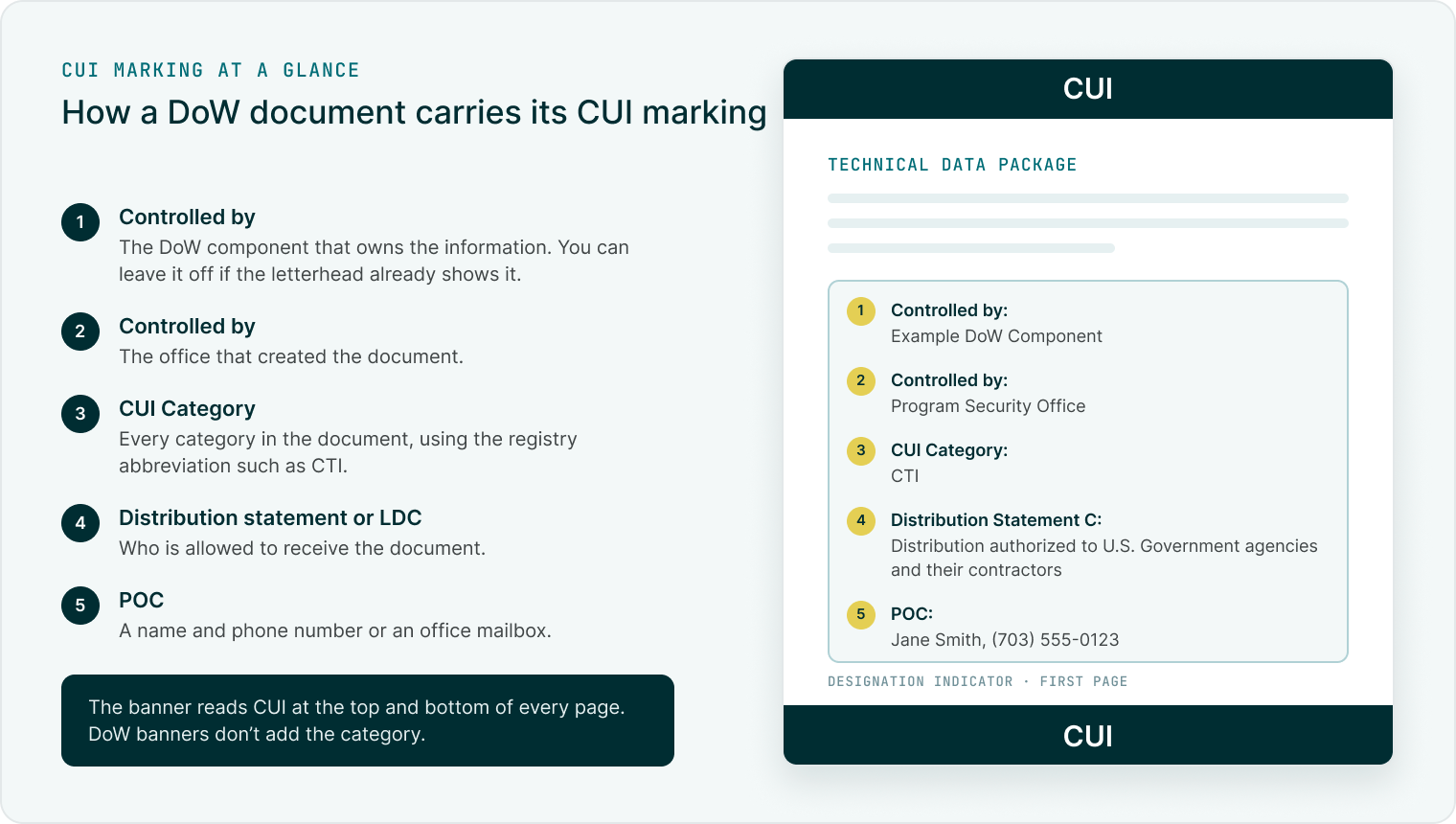
Put CUI at the top and bottom of every page that contains it. DoW guidance says the banner is CUI alone, without the category or a dissemination control added to it. The National Archives registry also lists banner formats such as CUI//SP-CTI, so follow the marking instructions in your contract.
The first page or cover carries the designation indicator. It names the DoW component and the office that control the information, lists every CUI category in the document by its registry abbreviation, gives the distribution statement or limited dissemination control, and names a point of contact. Technical data in the CTI and EXPT categories also needs a distribution statement.
Mark an email that contains CUI the same way you’d mark a document, with the CUI banner at the top of the message. If the CUI sits only in an attachment, mark the attachment and say in the message that it contains CUI. Many companies also add CUI to the subject line so it stands out in an inbox.
Files and folders
The marking belongs inside the file itself. Folder names and labels help people find CUI, but they don’t replace marking the document. Use access controls on folders and libraries that hold CUI so only people with a need to know can open them.
Paper, media and conversations
32 CFR 2002.14 requires CUI to be kept in a controlled environment that stops people without authorization from seeing or overhearing it. In practice that means locked storage for printed CUI and removable media when nobody’s using them. When you destroy CUI, the rule requires a method that leaves it unreadable, indecipherable and irrecoverable. If you discuss CUI in a meeting, tell the people in the room so they know what they’re hearing.
Mapping where CUI lives in your organization
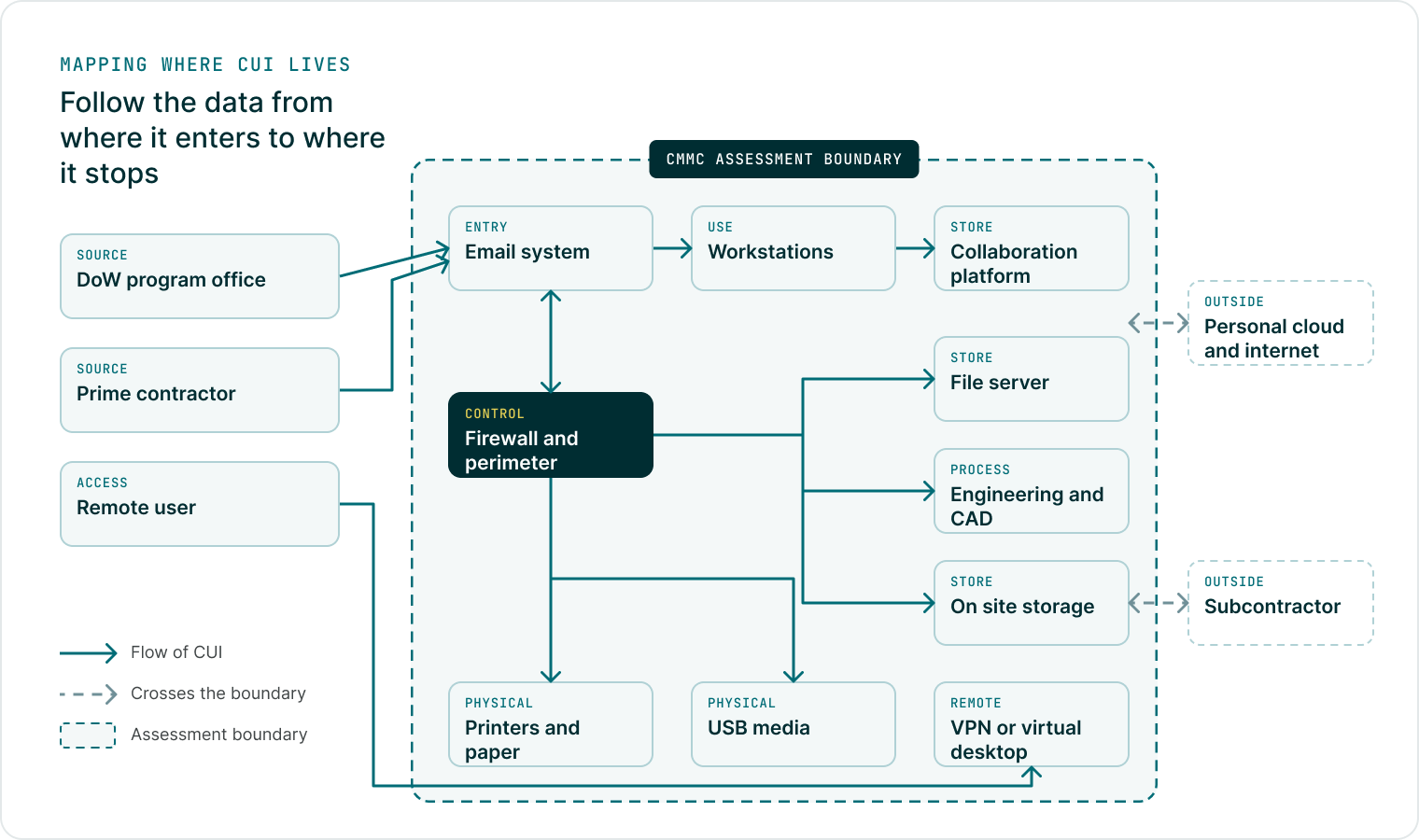
You can’t protect CUI you haven’t found. Before you set your CMMC assessment boundary, put controls in place or write System Security Plan statements, you need to know where CUI comes in, where it goes and where it stops. This is called data flow mapping or CUI scoping, and it’s where every Kieri engagement starts.
How CUI usually comes in
- Contracts and attachments such as statements of work, contract data requirements lists and technical specifications
- Government furnished information such as drawings, technical data and specifications provided to support the work
- Program office email and meeting notes from program reviews
- Review comments on your deliverables that include sensitive technical detail
- Subcontractor data that flows up to you from work they do on the program
Following CUI once it arrives
Trace the data itself. A drawing that arrives by email and gets saved to a shared drive has touched the email system, the workstation, the network and the file server, and each of those may be in scope. Check each of these.
- Email systems, including archiving and backup
- Shared drives, document management and collaboration platforms
- Engineering tools such as CAD and product lifecycle management systems
- Project management tools where CUI files are attached
- Printers, scanners and USB drives
- Remote access through VPN or virtual desktops
- Any cloud service where CUI is uploaded or stored
Building the data flow diagram
NIST SP 800-171 requirement 3.12.4 asks for a system security plan that describes your system boundary, your environment and how your systems connect. A data flow diagram is the clearest way to show that, and assessors ask to see one. It should show every system that touches CUI, the connections between them, and where the boundary sits between the CUI environment and everything else.
Three CUI handling risks to plan for
Each of these feels convenient in the moment, and each one moves CUI somewhere your program can’t protect it.

Personal devices
An employee opens a program email with technical specifications on a personal phone and forwards it to a personal account to read later. That phone and that mailbox now hold CUI, and neither one is managed or inside your boundary.
Use mobile device management or app protection policies so CUI email opens only in managed apps, block email access from unmanaged devices, and make the rule plain in policy and training. CUI never goes to personal accounts or unmanaged devices.
Personal cloud storage
An engineer saves a drawing to a personal Dropbox or a personal Microsoft account to work from home. The file is now outside your assessed environment. DFARS 252.204-7012 also requires cloud services that store covered defense information to meet security requirements equivalent to the FedRAMP Moderate baseline, and a personal account doesn’t meet that.
Give people a compliant way to work remotely, such as SharePoint or OneDrive in an environment set up for CUI, and make it easier to use than the personal option. Block uploads to personal cloud storage from managed devices, and cover this case in your acceptable use policy and training.
Sharing with subcontractors
A prime sends a technical specification to a subcontractor as an ordinary email attachment. The subcontractor has no CUI environment and doesn’t know the file is CUI. The prime has now passed CUI to a company that can’t protect it and may have missed the flow down requirements in its own contract.
Set a formal process for sharing CUI. Before you share, confirm the subcontractor has a NIST SP 800-171 program and a current SPRS score. Use an encrypted, compliant transfer method, put the flow down clauses in the subcontract, and keep track of which subcontractors hold CUI from your programs.
What handling CUI means for your compliance program
Once you know you handle CUI, a set of obligations follows. They came before CMMC, and CMMC is how they get verified.
NIST SP 800-171 applies
All 110 requirements in NIST SP 800-171 Rev 2 apply to every system that processes, stores or transmits CUI. Contractors with DFARS 252.204-7012 in their contracts were required to implement them by December 31, 2017.
A current SPRS score is required
If your contracts include DFARS 252.204-7019, you need a current NIST SP 800-171 assessment score posted in SPRS, no more than three years old. A missing score is a compliance problem on its own, whatever your security looks like. The SPRS guide covers how the score works.
Your boundary follows the CUI
The systems that touch CUI set the scope of your CMMC assessment. If your data flow map misses a system that holds CUI, your boundary is wrong, and an assessor will find the gap.
Handling rules go wherever the data goes
Marking and handling rules apply inside your facility and also to remote workers, people who travel and staff working at government sites. Your policies need to cover those cases, and your training needs to reach everyone with CUI access.
Common CUI identification mistakes
Each of these can be prevented with good scoping and training.
Assuming you don’t handle CUI
Many subcontractors assume they don’t have CUI because they don’t handle classified work. The bar for CUI is much lower. If you get specifications, drawings or program information from a prime or a government agency under a DoW contract, there’s a good chance some of it is CUI. Check your contracts, ask your prime and confirm with the program office.
Treating manufacturing drawings as ordinary files
Drawings and specifications for military equipment are usually Controlled Technical Information. Shops that treat government furnished drawings as normal business files often find their whole engineering environment is in scope.
Leaving email out
Email is where most CUI enters a contractor. Locking down file servers while program email runs through a mail system that isn’t set up for CUI leaves a gap an assessor will spot quickly.
Missing CUI your own team creates
CUI also includes what your own team produces. Reports, analyses, test results and designs your team produces for the program can be CUI too. Your SSP has to cover both what you receive and what you create.
Giving everyone access
CUI doesn’t need a clearance, but access should still follow need to know. Opening CUI to everyone on the network creates exposure and findings under the access control requirements.
Mixing CUI and other work in one environment
Running CUI and other work on the same systems puts all of it in scope. A separate CUI enclave usually costs less, because the CMMC controls apply only where CUI lives. That’s the design behind the Kieri Reference Architecture.
CUI questions
How do we know whether information we receive is CUI?
Start with your contract. Your contracting officer or program office has the final word on which information in your contract is CUI, and the CUI Registry at archives.gov/cui lists every category. If a document from a prime or an agency isn’t marked but looks sensitive, ask the sender. Until you hear back, protect it as CUI.
If we send CUI to a subcontractor, do they need NIST SP 800-171 too?
Yes. DFARS 252.204-7012 has to flow down to subcontracts that involve covered defense information, so the subcontractor needs NIST SP 800-171 in place. Problems at a subcontractor that got CUI from you affect your program too, so check for a current SPRS score and a working compliance program before you share.
Our work is all physical manufacturing. Do we still have CUI obligations?
Very likely. The drawings, material specifications, assembly procedures and test requirements for defense parts are usually Controlled Technical Information. The CAD files and specifications that run your machines are digital, so the email, engineering servers and other systems that store or send them are in scope.
Can employees work with CUI from home?
Yes, through compliant systems. A VPN into your CUI environment or a virtual desktop that keeps the data inside it can work when it’s set up correctly. Personal mailboxes, personal cloud storage and unmanaged devices don’t. Put this in your acceptable use policy and back it up with technical controls.
How should we store and destroy printed CUI?
Mark each page, keep it in locked storage when it isn’t in use, and don’t leave it where visitors or staff without a need to know can see it. When you no longer need it, destroy it so it’s unreadable, indecipherable and irrecoverable, which is the standard in 32 CFR 2002.14.
What if we receive CUI that isn’t marked?
The obligation to protect it doesn’t go away. Protect it as CUI and ask the sender to mark it correctly. Assessors look at whether you protected what needed protecting.
More CMMC technical guides
Microsoft 365 GCC High and CMMC
When you need GCC High for CUI and when you don’t.
Read the guide →
The System Security Plan for CMMC Level 2
What an assessor expects to read in your SSP.
Read the guide →
Your SPRS Score and What It Means
How the score is calculated and how to keep it current.
Read the guide →